The drive from your Windows PC is plugged into your Mac, and you cannot save a single file to it?
Windows drives on your Mac. Read and write.
NTFSHub reads any NTFS drive straight away. With two free add-ons you can write and format too, and the app walks you through every step.
€19 one-time · final price
No subscription · 12 months of updates included · 30-day money-back
Sales start soon. Sign up and you will be the first to know.
- Read NTFS at once, write with macFUSE and ntfs-3g
- All drives in one window: format, verify, repair
- If it does not work, 30 days to get your money back
Before
- Your Mac shows the drive, but saving to it does not work.
- You shuffle data back and forth the long way round because the drive is read-only.
- Disk Utility cannot format as NTFS and does not tell you which folders are eating your storage.
- Before every format there is that uneasy feeling: is this really the right drive?
After
- Read, write, done. The drive stays NTFS and keeps working on the Windows PC.
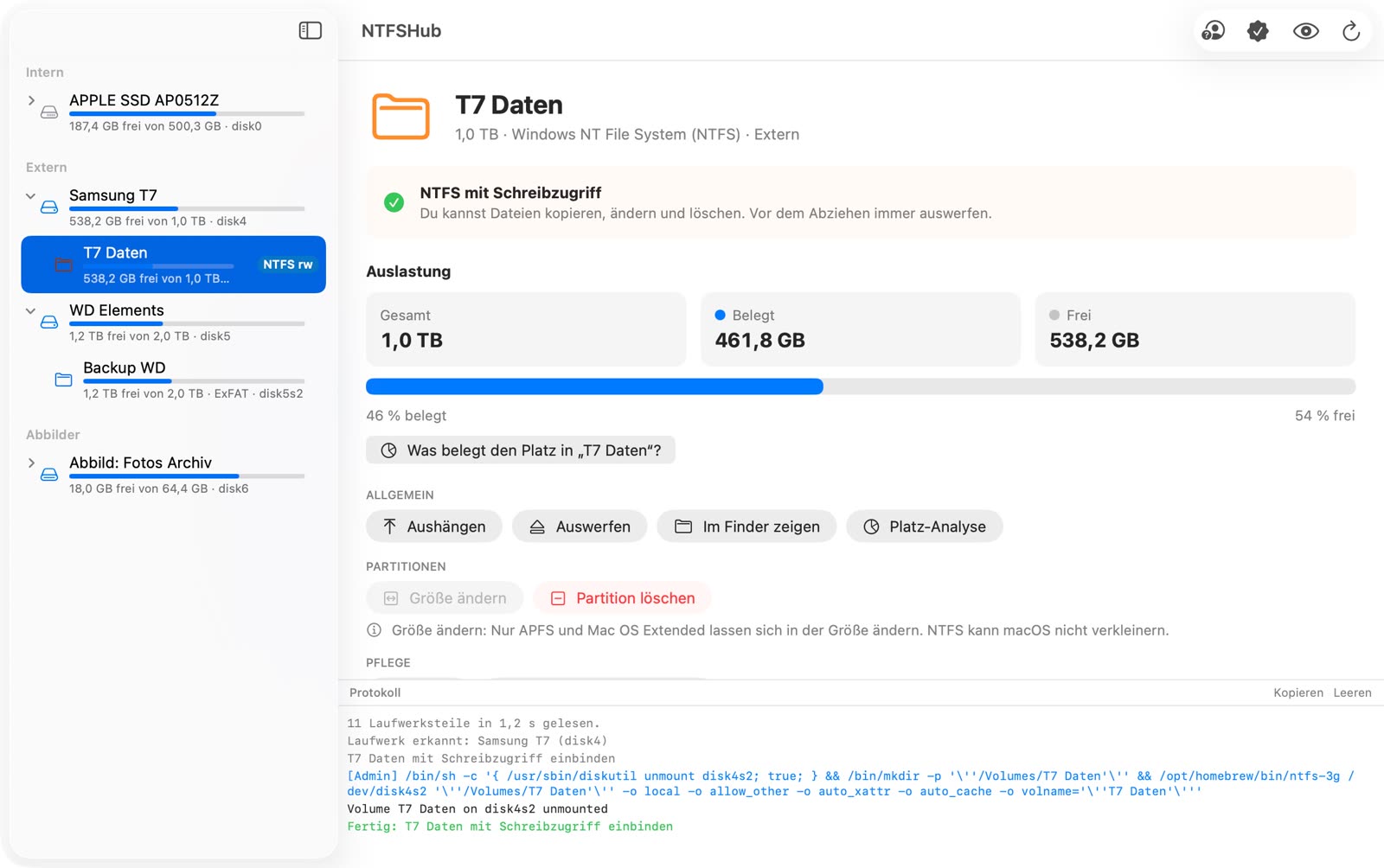
- All drives with their free space at a glance: internal, external and disk images.
- The space analysis shows you the biggest folders first.
- Your system drive is locked. Risky actions only go ahead once you type the name.
Swap files with Windows, no detour
Data from a colleague, a client or your old PC opens straight away. Writing back works as soon as the two add-ons are installed.
Every drive in the right format
Format as APFS, Mac OS Extended, ExFAT, FAT32 or NTFS. Set up whole drives with GPT or MBR, add and delete APFS volumes.
Win back storage
The space analysis sorts by size. You see at once where the gigabytes are hiding.
Repair before data goes missing
Verify and repair drives, create and restore .dmg disk images, measure read and write speed.
Mistakes are hard to make
The internal system drive cannot be erased, formatted or unmounted. For risky actions you type the drive name.
What you get
- NTFSHub for your Mac, a one-off purchase with no subscriptionstays yours, no term
- Read NTFS at once, write and format with the free add-ons macFUSE and ntfs-3gsaves you about 2 hours a month with 2 handovers a week (maths: 2 × 15 min detour × 4 weeks)
- Step-by-step help setting up the add-onsincluded
- Format, rename, verify, repair, mount and ejectincluded
- Space analysis: biggest folders firstincluded
- Create and restore disk images (.dmg), measure speedincluded
- Protection for your system drive and confirmation by nameincluded
- Updates for 12 months and a licence for 2 Macsincluded
- 30-day refund without giving a reasonI carry the risk
money back
Try everything for 30 days. No risk.
If mac-toools does not save you at least one hour of work in the first 30 days, send an email. You get your money back in full. No reason needed, no questions asked. The risk is on me, not on you.
Or get all 8 apps at once
For €59 you get NTFSHub plus seven more apps. On their own they would cost €197.
Any questions?
Why can my Mac not do this on its own?
macOS reads NTFS but cannot write to it. For that you need macFUSE and ntfs-3g, both free. NTFSHub checks whether they are installed and guides you through the setup.
Do I have to allow anything in the system?
Yes, once. macFUSE is a system extension that you approve under Privacy & Security. NTFSHub shows you where.
Could I delete something by accident?
Your system drive is fully locked, and every risky action needs you to type the drive name. Before formatting, the usual rule still applies: back up first.
Will it run on my Intel Mac?
No. NTFSHub needs a Mac with Apple Silicon (M1 or newer) and macOS 14 Sonoma or later.
Does it cost me again every year?
No. Pay €19 once and NTFSHub is yours. You get updates for 12 months. After that you can add another update year for 50 % of the price if you want.
And if it does not work with my drive?
Then write to hello@mac-toools.com within 30 days and you get your money back. No reason, no questions.
Next time a Windows drive turns up, just plug it in.
NTFSHub for €19, paid once. A licence for 2 Macs, 12 months of updates and 30 days to get your money back. No subscription, no obligation to renew.
€19 one-time · final price
No subscription · 12 months of updates included · 30-day money-back
Sales start soon. Sign up and you will be the first to know.
Coming soon
Be there when NTFSHub launches.
Sales start soon. Enter your email and you will be the first to know. One email at launch, nothing else.