
Thirty project folders, and you can no longer remember which command puts any of them live?
No more folder hunting. Every project is one click away.
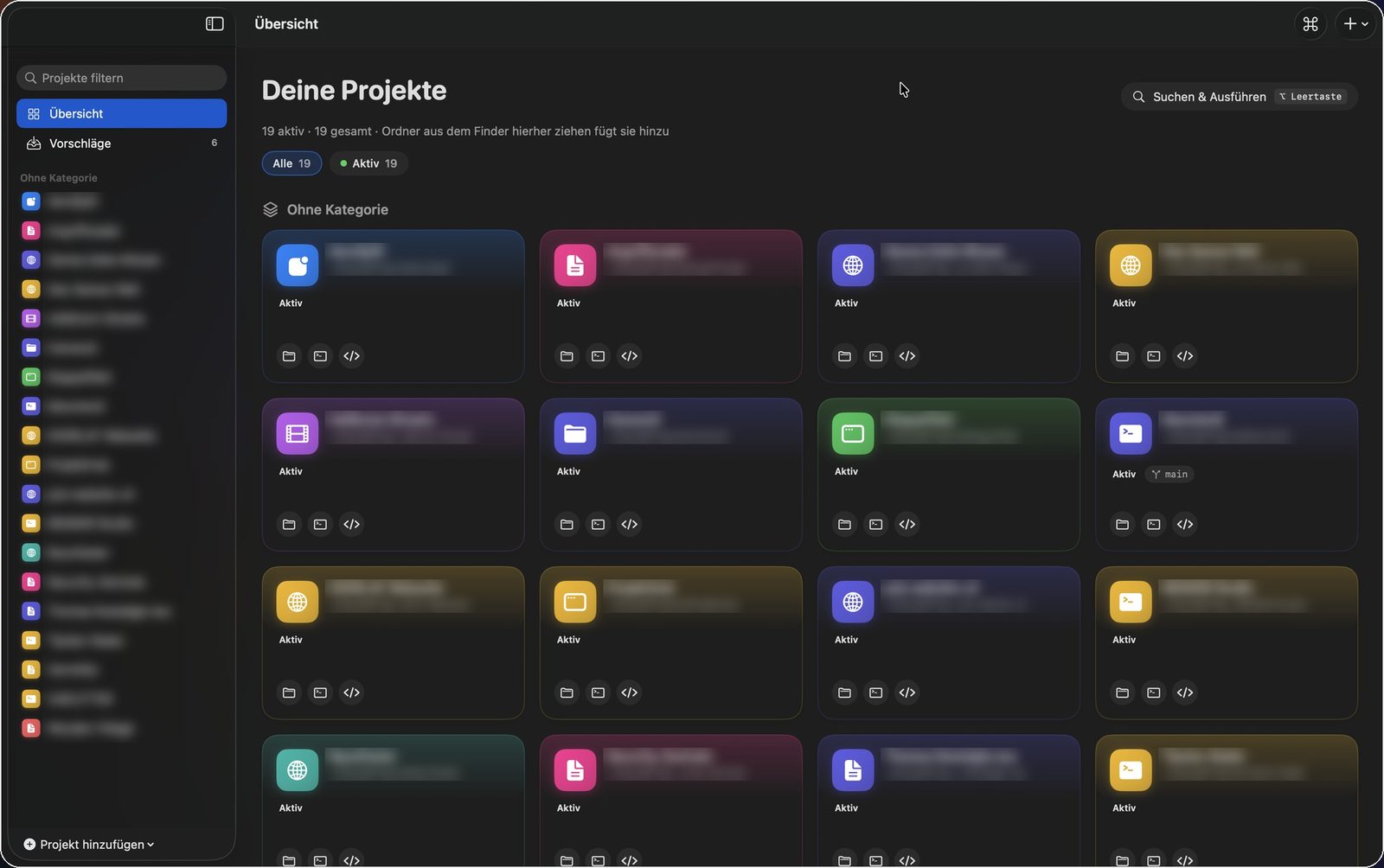
ProjektHub turns your folders into tiles with Finder, Terminal, your editor and your own commands already attached. One click and you are working.
€24 one-time · final price
No subscription · 12 months of updates included · 30-day money-back
Sales start soon. Sign up and you will be the first to know.
- Your own commands and deploys in one click, with a live log
- Git status and recently changed files at a glance
- The risk is mine: 30 days money back
Before
- You click through five levels of folders just to get started.
- The deploy command lives in a note somewhere.
- Which files did you change? Open FileZilla and pick them out one by one.
- You only find out which project has uncommitted changes when it is too late.
After
- All your projects sit in front of you as tiles, with colour, status and their own logo.
- "Deploy" is a button. If you like, ProjektHub asks before it runs.
- Changed files go up by FTP, checked against what is really on the server.
- A dot on the tile shows you uncommitted Git changes.
You start straight away
Finder, Terminal and your editor open right in the correct folder. No cd, no path, no searching.
Commands you never type again
Add your own commands or adopt what ProjektHub finds in the folder: deploy.sh, .command files, npm scripts, Vercel. Run them in Terminal or with a live log in the app.
Uploads without the worry
ProjektHub remembers, file by file, what is provably on the server. Only what has really changed is preselected.
Everything for a project in one place
Pinned folders, even outside the project, plus links, notes and an expandable file tree in a single view.
Your files stay untouched
Remove a project from the hub and only the entry disappears. Nothing is deleted.
What you get
- ProjektHub for your Mac, a one-off purchase with no subscription (Apple Silicon and Intel)pay once, use for ever
- Project tiles with Finder, Terminal, editor and linkssaves you about 5 hours a month with 10 project switches a day (maths: 10 × 90 sec × 20 working days)
- Your own commands and detected scripts in one click, with a safety promptincluded
- FTP upload of changed files only, verified after uploadingsaves you about 1 hour a month with 8 uploads (maths: 8 × 8 min of picking out files)
- Git status, recently changed files and notes for each projectincluded
- Suggestions from your project sources, iCloud folders includedincluded
- Every update for the next 12 monthsincluded
- Use on 2 Macs, say in the office and on your laptopincluded
- 30 days in which you can ask for your money backno risk for you
money back
Try everything for 30 days. No risk.
If mac-toools does not save you at least one hour of work in the first 30 days, send an email. You get your money back in full. No reason needed, no questions asked. The risk is on me, not on you.
Or get all 8 apps at once
For €59 you get ProjektHub plus seven more apps. On their own they would cost €197.
Any questions?
I already have Finder and Terminal.
True, and you keep using them. ProjektHub does not replace them, it just gets you there without the detour. The tile opens both in the right folder.
Does ProjektHub touch my project folders?
No. Only what you add yourself appears in the hub. Removing a project never deletes a file.
Where are my FTP login details kept?
If you use FileZilla, just pick your entry and ProjektHub takes the server and login from there. If you enter everything yourself, the password is stored only in the macOS keychain.
Is this only for programmers?
No. Anyone with lots of project folders gets something out of it, designers, photographers and agencies included. Commands and uploads are there if you want them, not a must.
What if I start a deploy by accident?
Turn on "Ask first" for that command. Then nothing runs without your confirmation.
Is it a subscription, and what if it is not for me?
No subscription. You pay €24 once, 12 months of updates are included, after that 50 % per extra update year if you want it. If it does not suit you, you get your money back within 30 days. An email to hello@mac-toools.com is enough.
Tomorrow morning: click a tile and get going.
ProjektHub for €24, paid once and yours for good. 12 months of updates and a licence for 2 Macs. If it saves you no time, you get your money back within 30 days.
€24 one-time · final price
No subscription · 12 months of updates included · 30-day money-back
Sales start soon. Sign up and you will be the first to know.
Coming soon
Be there when ProjektHub launches.
Sales start soon. Enter your email and you will be the first to know. One email at launch, nothing else.