
See where your money goes. No spreadsheet.
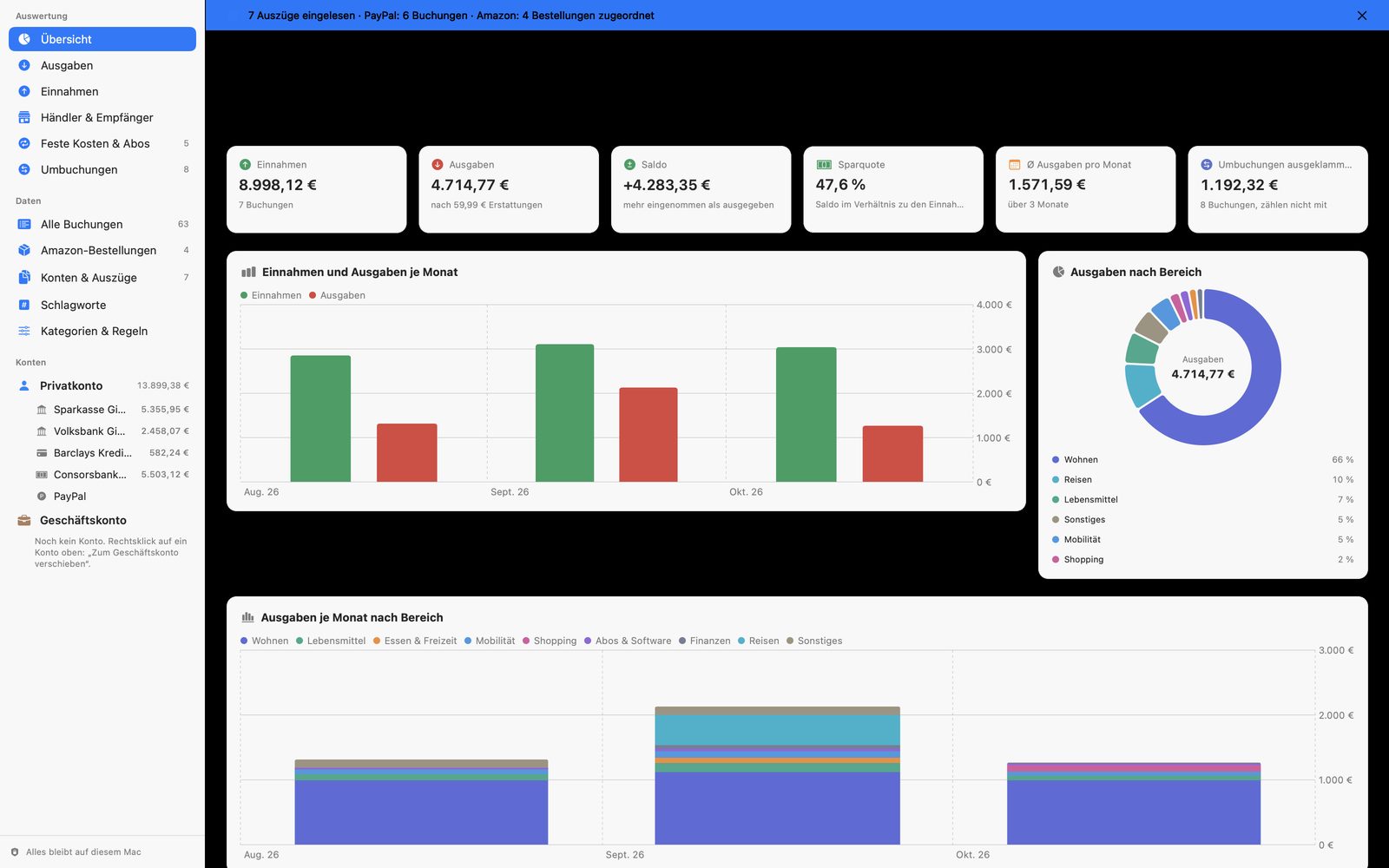
Drop your PDF statements into the window. Konto Hub reads every transaction, assigns a merchant and a category, and adds up income, spending and savings rate across all your accounts.
€39 one-time · final price
No subscription · 12 months of updates included · 30-day money-back
Konto Hub
How Konto Hub works
Konto Hub
What changes for you
A clear picture at last
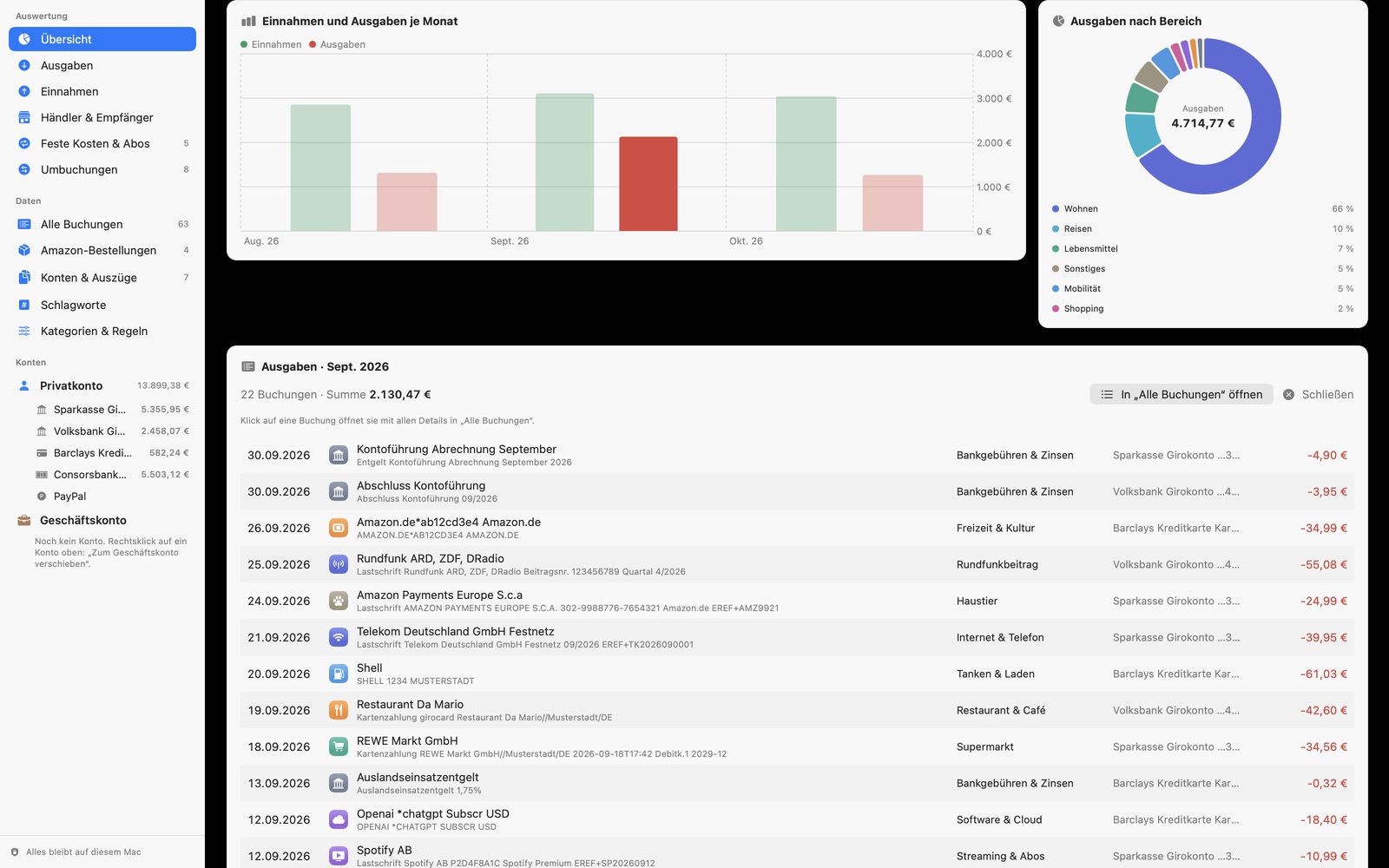
Income, spending, balance and savings rate for every account sit on one page. Click a tile or a bar and you see the transactions behind it, with exactly the same total.
No euro counted twice
Card settlement, PayPal top-up, transfer to savings: Konto Hub recognises these internal transfers and counts each amount only once.
Subscriptions stand out
Recurring payments get their own page. You see the rhythm, the cost per month and per year, and the date of the next charge.
Amazon makes sense
Instead of "Amazon Payments" you see which item sits behind the charge. Just drop your Amazon order export into the window.
Less work at tax time
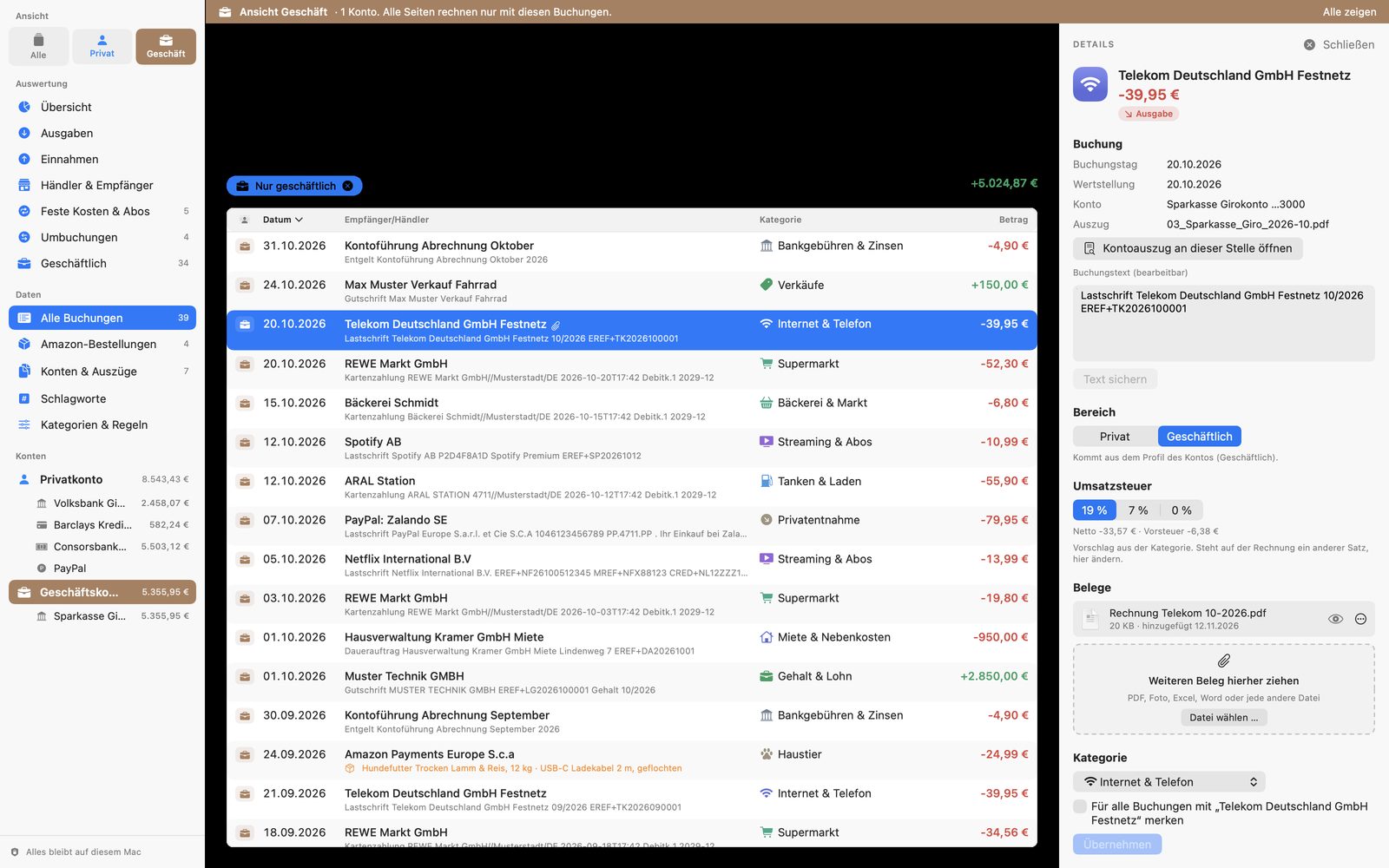
Business transactions get a receipt and a tax rate. At the end you get a DATEV folder with the booking batch and every receipt.
Your figures stay with you
No bank access, no server, no account with us. Konto Hub works without any internet connection.
This is how easy it is
- Download your statements as PDF from online banking. Scanned statements work too.
- Drag the files into the window, or pick an inbox folder that Konto Hub reads by itself.
- Look at the overview, click a bar, done.
Everything included
- Current account, savings and credit card, plus PayPal CSV and the Amazon order export
- No template per bank: dates, amounts and balances are detected in general
- Balance check per statement, green or red with the exact difference
- macOS text recognition for scanned statements
- Inbox folder in Downloads, iCloud or on a NAS: new statements come in on their own
- Every transaction opens the original statement at the right line, highlighted in yellow
- Rename and merge merchants, add your own categories, rules and tags like #holiday
- Attach receipts as PDF, photo, Excel or Word file
- Private and business kept apart, tax rate of 19, 7 or 0 % per transaction, profit preview
- DATEV export with receipts, CSV export of all transactions
Konto Hub
All features at a glance
Everything Konto Hub can do, sorted by topic.
Import and recognition
- Pick statements with
⌘O, or drop PDFs and whole folders anywhere on the window - A progress bar runs while reading, then a banner reports new statements, new transactions and skipped files
- Reads bank, account type, IBAN or card number, period, opening and closing balance from the statement header
- Understands signs before or after the number, S and H markers and separate debit and credit columns
- Lines without a date are attached to the transaction above as its reference text
- If the balance only adds up with flipped signs, Konto Hub flips them itself and tells you so
- The same file twice, or a transaction with the same date and amount in the same account, is counted once
- PayPal: only completed payments in euros, fees as separate entries, currency conversions with the real merchant
- Amazon: ZIP or CSV from the data export, cancelled orders are left out
Inbox folder
- Choose one or more folders, subfolders are read as well
- New PDFs, PayPal files and Amazon exports placed there arrive in the app without a click
- Reacts the moment something changes in the folder and also checks once a minute
- "Check now" runs a pass straight away, a switch pauses the watching
- Files already read are remembered, files still being written are picked up on the next pass
Overview and analysis
- Tiles for income, spending, balance, savings rate, average monthly spending and excluded transfers
- Charts: income and spending per month, spending per group as a ring, monthly bars stacked by group
- Lists of the top ten categories, the top ten merchants and the largest single payments
- Click a tile, bar or ring segment to list the transactions behind it, with a total that matches the tile
- From that list you jump into "All transactions" with the whole selection, shown as a filter chip
- Spending and income pages: group and category with amount, count, share and monthly average, expandable down to merchant
- Choose the period: everything, the last 12 months from the newest transaction, one year or one month
- Narrow the analysis to single accounts or to one tag such as #holiday
- Ready-made categories in groups like housing, groceries, mobility, health and finance
Transfers, refunds and subscriptions
- Money moved between your own accounts is linked as a pair and never counted as income or spending
- The monthly credit card debit is offset against the card statement or its settlement balance
- Debits without a counterpart appear under possible double counts, mark one or all of them as a transfer
- A credit from the same merchant up to 120 days after a purchase is treated as a refund
- Saving and investing stays your money and does not count as spending
- Recurring payments from weekly to yearly, with their usual amount and whether they are active or ended
- Hide subscriptions you do not care about and bring them back when needed
Editing transactions
- List with date, merchant, category, account and amount, click a column heading to sort
- Search across text, merchant, category, note, amount, receipt names and Amazon items,
#wordsearches tags only - Filters for category, tag and receipts,
⌘Aselects every transaction found - For many transactions at once: set category, tag, merchant and note, or search and replace text
- Edit the transaction text, the original from the PDF is kept and can be restored
- Optionally remember a new category as a rule, so every matching transaction gets it
- Right-click: category, tag, scope, attach receipt, show only this merchant, copy text
- "Automatic" gives a transaction its rule-based category back
- Close the detail pane with
Esc
Merchants, categories and tags
- Merchant table with a spending or income switch, a filter field and double-click to the transactions
- A new merchant name also applies to statements you import later, a pencil marks renamed ones
- The originally detected names are stored and can be restored
- Merge two spellings of the same merchant into one
- Set one category for every transaction of a merchant
- Create and delete your own categories with name, symbol, group and type (spending or income)
- Your own keyword rules, applied before the built-in ones
- Tags page with count, spending and income per tag, rename, delete and analyse
- Tag rules mark every matching transaction, future ones included
Receipts and the original statement
- Drag a file onto a row, drop it in the detail pane or right-click and attach it
- One receipt for several selected transactions in one go
- View, open, reveal in Finder or detach a receipt, unused copies go to the Bin
- A paper clip in the list and a filter for with or without receipt, transfers are ignored there
- The receipts button copies the receipts of the visible transactions into a folder, named by date, amount and merchant
- If a statement has moved, Konto Hub finds it again by checksum in Downloads, Documents and Desktop
- Open the statement in Preview or reveal it in Finder
Amazon orders
- Pick the year from a menu with arrows, independent of the period at the top
- Spending per year by the seven largest categories, per month for a single year
- Tiles for orders, order value, matched orders and Amazon debits without an order
- Below every matched debit the purchased items appear in orange
- Change the category of each item or let all item categories be detected again
- Jump from an order to its bank debit with one button
- Link to the Amazon data request with instructions, delete Amazon data after a prompt
Private, business and tax
- View all, private or business, a coloured bar shows which one is active
- Account tree in the sidebar with the balance from the latest statement, right-click moves an account to the other side
- Click the symbol in front of a transaction to switch it between private and business
- Owner withdrawals and owner deposits are detected and count neither as business income nor as business costs
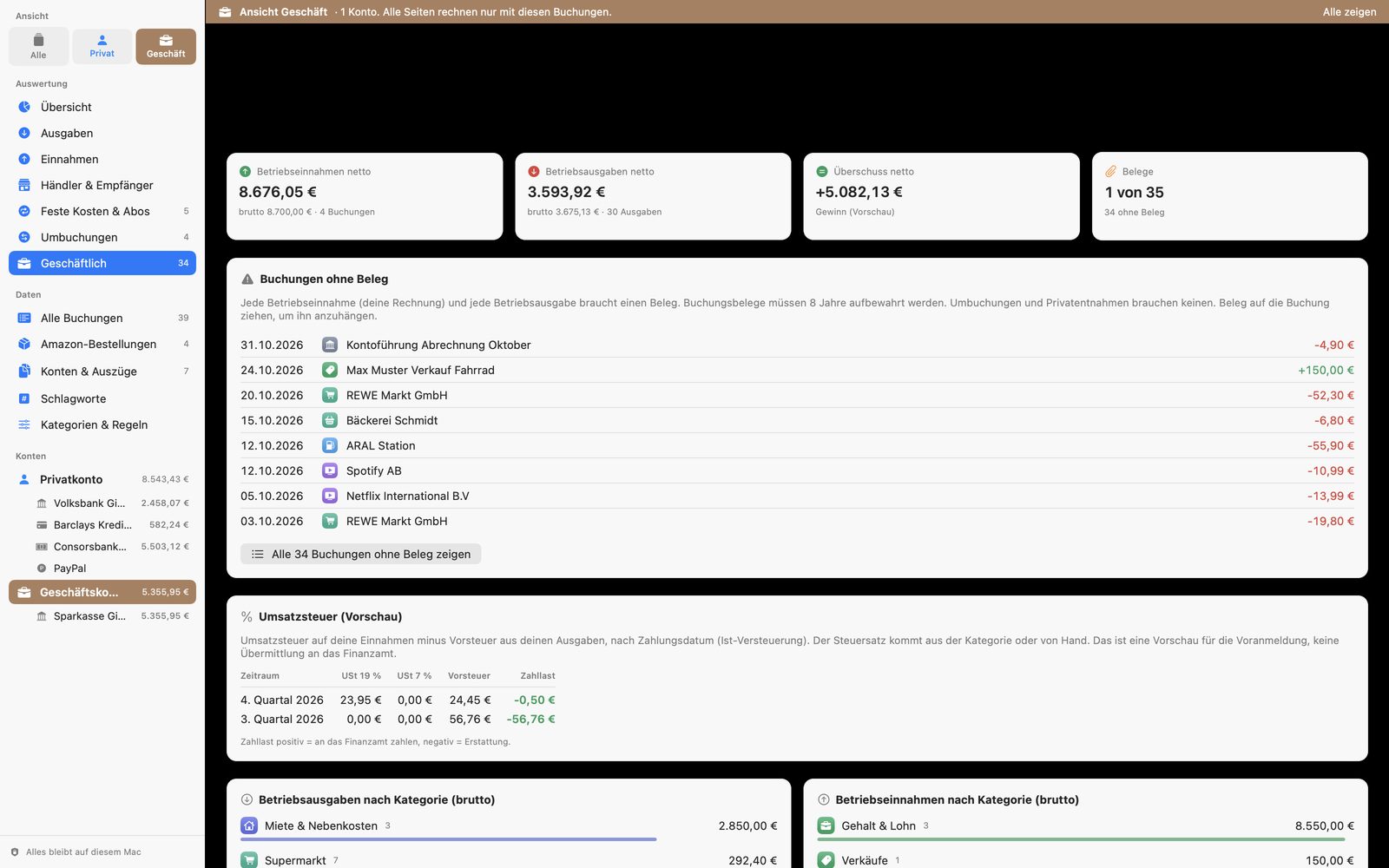
- Business page with business income, business costs, net and gross profit, and receipts as "x of y"
- Output VAT and input VAT with the amount payable per month or quarter, by payment date
- Tax rate suggested from the category, small business mode under section 19 UStG without VAT
- DATEV with SKR 03 or SKR 04, financial year, account number length, bank account per account and ledger account per category
- Every receipt file in the export is named after the receipt number of its transaction
Accounts, data and keyboard
- Rename accounts, change the account type and reverse all signs of an account if needed
- Per statement: period, count, balances, check result, text recognition, reveal in Finder, remove after a prompt
- CSV with
⇧⌘E, including columns for scope, receipts and tags, umlauts display correctly in Excel - Open pages with
⌘1to⌘9,⌘0takes you back to the overview - Show the data folder in Finder, delete all data after a prompt, your PDF files stay untouched
System requirements
Does it run on your Mac?
- macOS
- 14 Sonoma or later
- Processor
- Apple SiliconM1 or later, no Intel
- Notes
- Anything else you need is listed in the overview. All details and all apps compared ›
Konto Hub
Konto Hub is yours. Forever.
€39one-time · final price
€39 one-time · final price
No subscription · 12 months of updates included · 30-day money-back
Sales start soon. Sign up and you will be the first to know.
After that, optional: each further year of updates for 50 % of the price. The app keeps working without it.
Even better value: all 6 apps
Konto Hub is part of the complete bundle. All 6 apps for €59 instead of €149.
See the bundleQuestions about Konto Hub
Which banks does Konto Hub read?
Konto Hub needs no template for your bank. It looks for patterns found on almost every German statement: a date at the start of the line, the amount on the right, old and new balance. It recognises many banks by name, such as Sparkasse, Volksbank, ING, DKB, comdirect, N26 or American Express. For an unknown bank you type in the name yourself.
What if a statement is read incorrectly?
Every statement is recalculated: old balance plus all transactions must equal the new balance. If it does, it turns green. If not, it is marked red and you see the difference. Password-protected PDFs are the one thing Konto Hub cannot open.
Do I need my online banking login?
No, Konto Hub never connects to a bank. It only reads the PDF files you give it. Your PIN and TANs stay where they belong.
Is my credit card counted twice?
No, the individual card purchases count as spending, and the monthly settlement on your current account becomes a transfer. If Konto Hub finds no matching counterpart, it lists the charge under possible double counts so you can decide.
What does my tax adviser get?
A folder with the DATEV booking batch for the chosen period and all receipts, named after their receipt number. Only business transactions go in. You enter the adviser and client number once in the settings.
Where is my data stored?
In a folder under Library/Application Support on your Mac. Receipts are copied into a subfolder next to it, the original stays where it is. The Data menu opens the folder in Finder.
Coming soon
Be there when Konto Hub launches.
Sales start soon. Enter your email and you will be the first to know. One email at launch, nothing else.