Full HD becomes 4K. Right on your Mac.
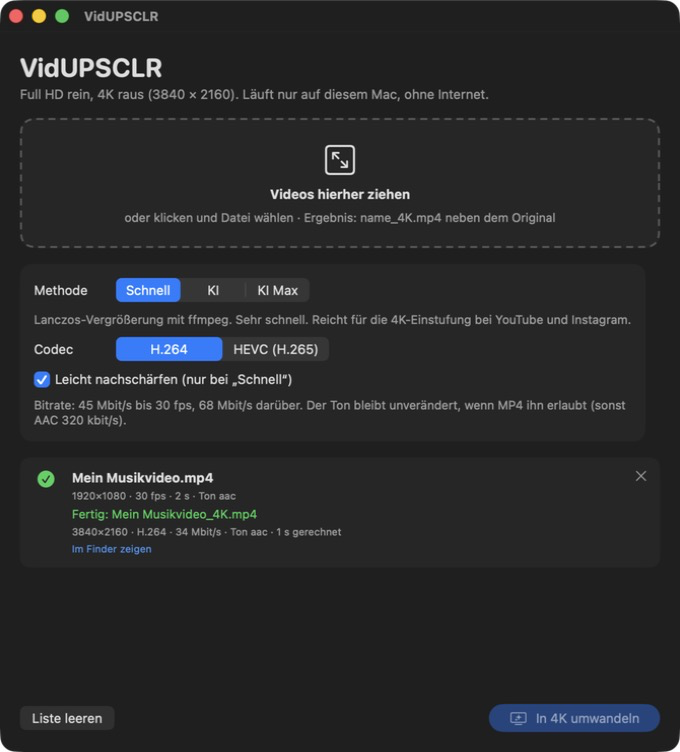
Drop your video into the window and VidUPSCLR saves a 3840 × 2160 version right next to it. Your Mac does the work, and no video ever goes online.
€24 one-time · final price
No subscription · 12 months of updates included · 30-day money-back
VidUPSCLR
How VidUPSCLR works
VidUPSCLR
What changes for you
The 4K tier on YouTube
YouTube gives 4K uploads a higher quality tier, even for viewers watching in 1080p. VidUPSCLR delivers exactly the dimensions that count.
Your videos stay with you
No upload, no account, no third-party server. Your Mac does the upscaling, even in flight mode.
Vertical Reels and Shorts
Portrait becomes 2160 × 3840, square becomes 2160 × 2160. Rotated phone footage is detected correctly.
Your sound stays as it is
Every audio track is copied whenever MP4 allows it. Only formats such as PCM from .mov are converted to AAC at 320 kbit/s.
Fast or with AI
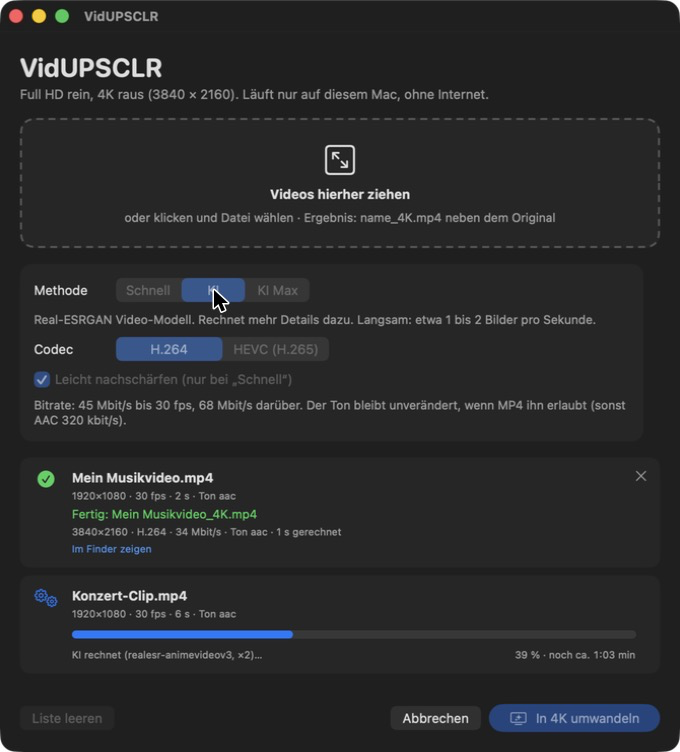
The fast method is enough for the 4K tier. If you want more detail, Real-ESRGAN redraws every single frame.
Whole batches, unattended
Drop in several videos and start once. The app works through the list in order and lets you know in the Dock when everything is done.
This is how easy it is
- Drag a video into the window or onto the Dock icon.
- Pick a method and a codec. Fast and H.264 are preset.
- Click convert to 4K. The new file
name_4K.mp4appears next to the original.
Everything included
- Output 3840 × 2160, portrait 2160 × 3840, square 2160 × 2160
- Fast, AI and AI Max methods (Real-ESRGAN)
- H.264 or HEVC (H.265) codec
- Fixed bitrate following YouTube guidance: 45 or 68 Mbit/s
- Encoded with your Mac's hardware encoder (VideoToolbox)
- All audio tracks kept, usually without conversion
- Result
name_4K.mp4in the original's folder - Progress in per cent with time left, cancel with Esc
- Fully offline, Real-ESRGAN ships inside the app
VidUPSCLR
All features at a glance
Everything VidUPSCLR can do, sorted by topic.
Adding videos
- Drag videos into the window, they then wait in the list
- Clicking the drop area or pressing ⌘O opens the file picker, also for several files
- Drop onto the Dock icon or use Open With in Finder: starts at once with the current settings
- Formats mp4, mov, m4v, mkv, avi, webm, mts, m2ts, mpg and mpeg
- Other files are simply skipped
- For each video the list shows resolution, frame rate, length and sound of the source
Size and picture
- Landscape is brought to 3840 × 2160 pixels
- Portrait for Reels and Shorts becomes 2160 × 3840
- Square videos become 2160 × 2160
- Aspect ratio is kept, empty areas turn black
- Phone rotation is read from the metadata
- BT.709 colour space, yuv420p pixel format
- Optional light sharpening with Fast (on by default)
Three methods
- Fast: Lanczos enlargement with ffmpeg, the default
- AI: Real-ESRGAN video model realesr-animevideov3, factor 2 to 4 depending on the source
- AI Max: Real-ESRGAN x4plus, meant for real footage and short clips
- Real-ESRGAN and all models live inside the app bundle, nothing is downloaded
- AI works in batches of 48 frames, keeping temporary files at about 300 MB
- The temporary folder is always removed, even after an error or a cancel
Codec and quality
- H.264 High profile, level 5.1 up to 30 fps and 5.2 above
- HEVC (H.265) tagged as hvc1
- Target bitrate 45 Mbit/s up to 30 fps, 68 Mbit/s at higher frame rates
- Values based on YouTube's recommendations for 2160p uploads
- Keyframe interval: half the frame rate
- Hardware encoding via VideoToolbox
- MP4 with faststart: playback begins before the file has fully loaded
Sound and output file
- Every audio track of the source comes along
- AAC, MP3, AC3, E-AC3, ALAC, Opus and FLAC are copied unchanged
- Other audio formats such as PCM become AAC at 320 kbit/s
- Source metadata is carried over
- Never overwritten: same name gets (2), (3) and so on
- When done, the list shows size, codec, bitrate and sound of the new file
- One click on Show in Finder opens the folder with the result
Flow and control
- As many videos in the list as you like, one after another
- Bar, current step, per cent and estimated time left
- Start converting with ⌘↩
- Cancelling deletes the half-written file, the other videos keep waiting
- Settings are locked while a video is being processed
- Remove single entries or clear the list
- The app asks before quitting if a video is still running
- The Dock icon bounces once all videos are through
Notices and command line
- Red notice with the install command when ffmpeg is missing
- Orange notice for HDR sources
- Clear error messages, for example for a read-only folder or a file without a video track
- Command-line tool
upscale4kinside the app bundle, with the same methods and codecs - There you also get software encoding with libx264 or libx265 and a custom output name
--probeshows the values of a file,--toolsthe programs found
System requirements
Does it run on your Mac?
- macOS
- 14 Sonoma or later
- Processor
- Apple SiliconM1 or later, no Intel
- Notes
- Anything else you need is listed in the overview. All details and all apps compared ›
VidUPSCLR
VidUPSCLR is yours. Forever.
€24one-time · final price
€24 one-time · final price
No subscription · 12 months of updates included · 30-day money-back
Sales start soon. Sign up and you will be the first to know.
After that, optional: each further year of updates for 50 % of the price. The app keeps working without it.
Even better value: all 7 apps
VidUPSCLR is part of the complete bundle. All 7 apps for €59 instead of €178.
See the bundleQuestions about VidUPSCLR
Why do I need ffmpeg, and where do I get it?
VidUPSCLR reads and writes video with the free program ffmpeg. It is not bundled with the app. You install it once at no cost, for example with Homebrew: brew install ffmpeg. If it is missing, the app shows a red notice at the top with exactly that command. Details are on the system requirements page.
Which method suits my video?
Fast enlarges with Lanczos and is enough for the 4K tier. AI uses a Real-ESRGAN video model built for animation, so real footage can look slightly painted. AI Max gets the most detail out of real footage, but it is very slow and best kept for short clips.
How long does upscaling take?
Measured on a Mac with M4 Pro: Fast runs at about twice real time. AI manages around 1.7 frames per second, so one minute of 30 fps video takes roughly 18 minutes. AI Max is considerably slower still.
Does 4K really make my video sharper?
The fast method does not invent detail, it enlarges cleanly. The gain is the tier YouTube gives your upload. Only AI and AI Max add extra detail.
Is my original changed or overwritten?
No. VidUPSCLR always writes a new file into the same folder. If name_4K.mp4 already exists, the next one is called name_4K (2).mp4. If you cancel, the app deletes the half-finished file.
Which files can I drop in?
MP4, MOV, M4V, MKV, AVI, WebM, MTS, M2TS, MPG and MPEG. If the aspect ratio differs, the app fits the picture as large as possible and fills the rest with black, so the file always has exact 4K dimensions.
What happens to HDR videos?
The output is SDR in the BT.709 colour space. With an HDR source the app shows an orange notice, because colours may look paler afterwards.
Coming soon
Be there when VidUPSCLR launches.
Sales start soon. Enter your email and you will be the first to know. One email at launch, nothing else.