Your iPhone becomes the remote for your Mac.
From the sofa, the lectern or on the road, RemoteHub handles what you would normally do at the desk: playback, volume, pointer, typing, slides, apps and the Mac itself. A small menu bar app carries out the commands, with no server in between.
€24 one-time · final price
No subscription · 12 months of updates included · 30-day money-back


RemoteHub
How RemoteHub works
RemoteHub
What changes for you
Stay seated
Pause, next track, louder, switch output to headphones: all from your iPhone. The Mac can sit across the room, by the TV or under the desk.
Present freely
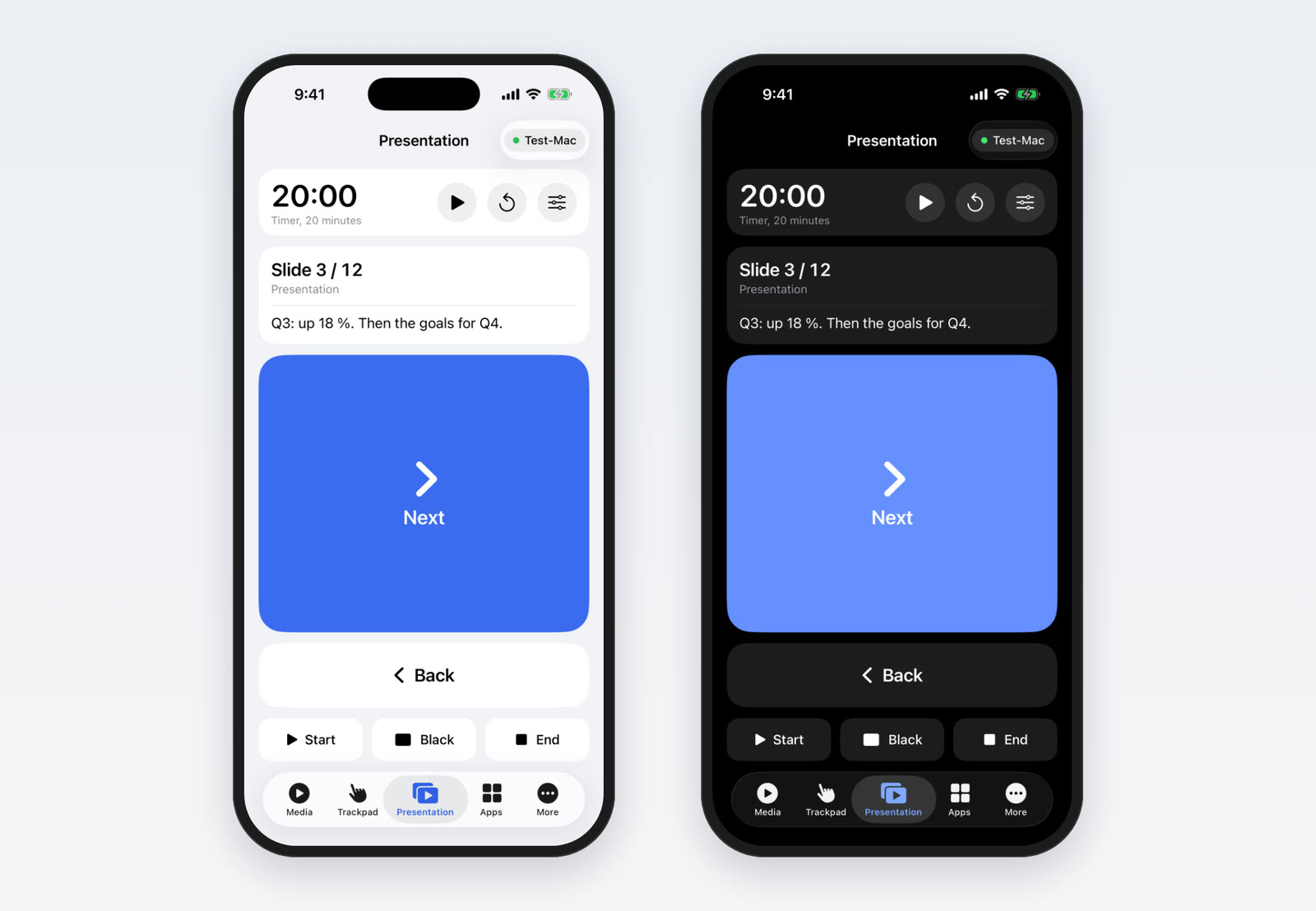
Move through slides, black out the screen and keep an eye on your speaking time. With Keynote you also see the slide number and your notes. Shortly before the end, the iPhone vibrates.
The whole Mac in your hand
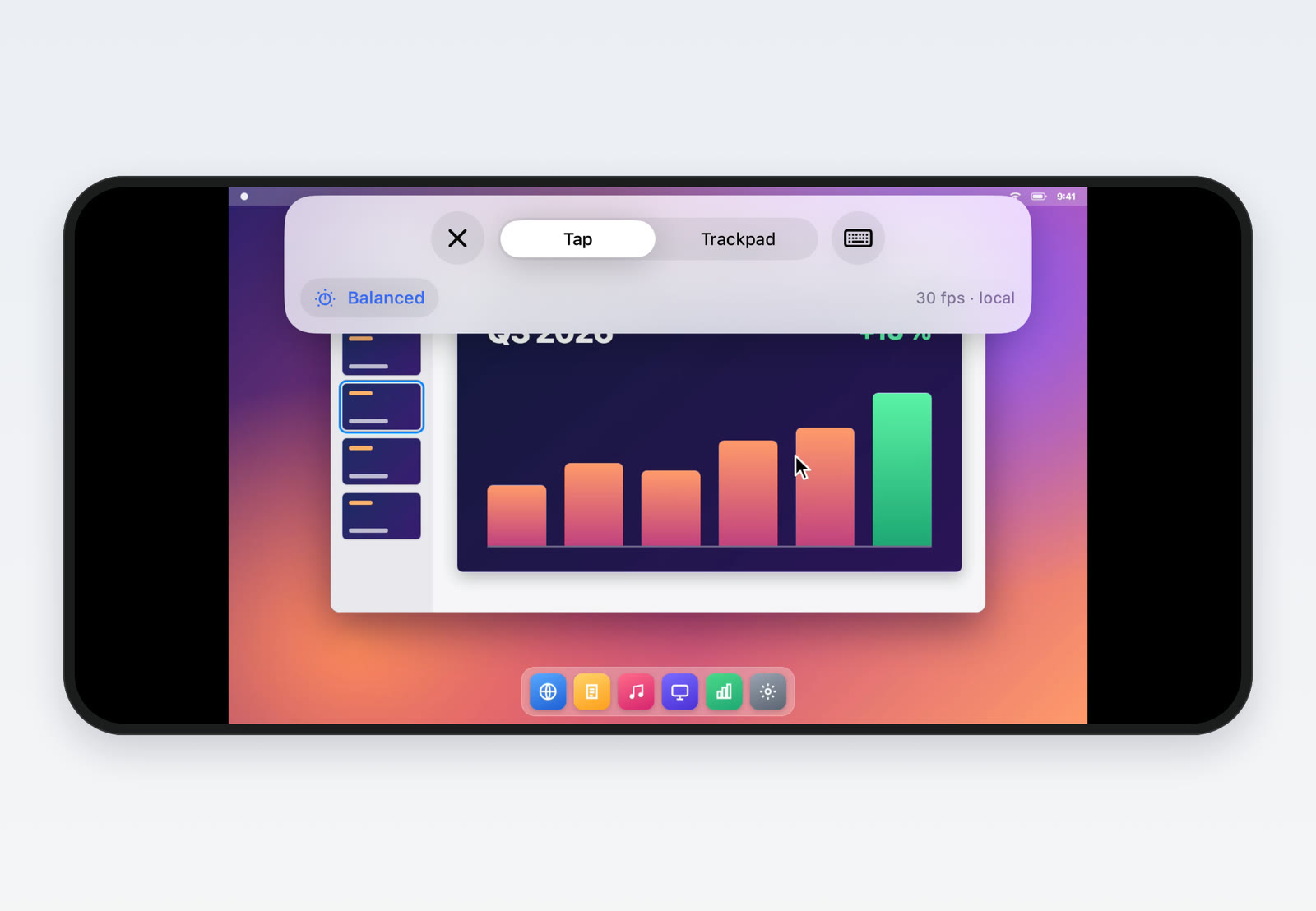
When buttons are not enough, open the live view of the Mac. A tap clicks right there, two fingers scroll or zoom. Ideal for a Mac mini without a display.
Connects on its own
Pair once with a QR code, and from then on the iPhone finds your Mac on Wi-Fi by itself. If something goes wrong, the app tells you in plain words what is causing it.
Nobody listens in
Every command travels encrypted straight from iPhone to Mac. No server in the middle, no account, no ads. On the Mac you can always see which iPhone is connected.
Pay once, done
No subscription for volume, no paywall for sleep mode. One purchase gets you every feature, on the Mac and on the iPhone.
This is how easy it is
- Start RemoteHub on the Mac. It shows up as a small icon in the menu bar.
- On the Mac, choose Pair iPhone and scan the QR code with RemoteHub on your iPhone.
- Done. From now on the iPhone connects by itself whenever both are on the same network.
Everything included
- Media, volume, brightness and audio output
- Trackpad with gestures, keyboard with shortcuts
- Presentation with timer and slide counter
- Open, bring forward and quit apps
- Lock, sleep, restart, shut down
- Live view of the Mac with tap and zoom
- Custom buttons and clipboard
- Siri and Shortcuts
- End-to-end encrypted, no server
- One purchase for Mac and iPhone: the iPhone app is included
RemoteHub
All features at a glance
Everything RemoteHub can do, sorted by topic.
Connect and pair
- Pair with a QR code from the Mac, valid for 10 minutes and for one iPhone only
- Without a camera: pair with a 6-digit code that you confirm on the Mac
- The iPhone looks for paired Macs on Wi-Fi itself and connects without a code
- After sleep or a Wi-Fi change the connection rebuilds itself
- Help card with the most common causes if no Mac shows up
- Pair several Macs and switch between them
- A small label at the top shows the Mac name and whether the link is up
Media and sound
- Play and pause, previous and next track, for any music or video app
- Now Playing with title, artist and progress for Music and Spotify
- Artwork from the Music app
- Volume slider from 0 to 100 % and a mute button
- Switch audio output, for example to headphones or speakers
- Make the built-in display brighter or darker
- Changes made on the Mac appear on the iPhone straight away
Trackpad and keyboard
- One finger moves the pointer, with acceleration
- Tap to click, tap twice for a double click, three times for a triple click
- Two-finger tap for a right click, two-finger drag to scroll
- Rest a finger briefly, then move: drag with the button held
- Light vibration on each click
- Full-screen keyboard with a bar for Copy, Paste, Undo, Find, New Tab and Save
- ctrl, opt, shift and cmd for the next key
- esc, Tab, arrows, Page Up and Down, Delete and F1 to F12
- Have the text from the iPhone clipboard typed on the Mac
- Adjustable pointer speed and scroll direction
Screen view
- Live picture of the Mac in portrait and landscape
- Tap mode: the click lands exactly where you tap
- Long press for a right click, long press and move to drag
- Two fingers scroll, spreading them zooms up to five times
- Trackpad mode: move the pointer as usual while the picture stays visible
- Keyboard over the picture with esc, Tab, arrows and modifier keys
- Three quality levels: Fast, Balanced and Sharp
- With several displays you pick which one is shown
- Can be switched off on the Mac, with an eye in the menu bar and an End button
Presentation
- Large Next button, plus Previous, Start, Black and End
- Timer with a speaking time from 1 to 180 minutes
- Warning before the end: the number turns orange and the iPhone vibrates
- In overtime it turns red with one more vibration
- With Keynote: slide 3 of 12 and the notes for that slide
- The iPhone display stays on while you present
Apps
- Every app on the Mac with its icon in a grid
- Green dot for apps that are running
- Search by name
- A tap opens the app or brings it to the front
- Quit running apps, unsaved work is handled by the app itself
Power, custom buttons and Siri
- Lock, display off and sleep
- Restart, shut down and log out with a confirmation
- Custom buttons for shortcuts, apps, web addresses, Shortcuts on the Mac or ready-made text
- An icon for each custom button, chosen from 32
- Send text from the iPhone to the Mac clipboard and back
- Nine actions without opening the app: play, next and previous track, louder, quieter, mute, lock, next and previous slide
- Say them to Siri or build them into your own shortcuts
- If the app is closed, the action connects briefly by itself and disconnects afterwards
On the road
- Through a VPN program that links your own devices
- Enter the Mac address by hand, the app remembers addresses that worked
- Live view quality adapts to the slower route
- No server of ours, no account
On the Mac
- Small menu bar window with connected and paired iPhones
- Pause switch: the iPhone stays connected but the Mac carries out nothing
- The last 30 commands with the time, typed text never appears there
- Permissions at a glance with a button to the right setting
- Starts at login if you want
Security and privacy
- End-to-end encrypted with X25519 and ChaCha20-Poly1305
- Direct connection between your devices
- No account, no cloud, no ads, no tracking
- Forget paired iPhones on the Mac at any time
System requirements
Does it run on your Mac?
- macOS
- 14 Sonoma or later
- Processor
- Apple Silicon and IntelUniversal app
- Notes
- Anything else you need is listed in the overview. All details and all apps compared ›
RemoteHub
RemoteHub is yours. Forever.
€24one-time · final price
€24 one-time · final price
No subscription · 12 months of updates included · 30-day money-back
Sales start soon. Sign up and you will be the first to know.
One purchase for Mac, iPhone and iPad: RemoteHub runs on 2 Macs, plus as a keyboard on your iPhone and iPad.
After that, optional: each further year of updates for 50 % of the price. The app keeps working without it.
Even better value: all 9 apps
RemoteHub is part of the complete bundle. All 9 apps for €59 instead of €221.
See the bundleQuestions about RemoteHub
What do I need?
A Mac with macOS 14 Sonoma or later, with Apple silicon or an Intel processor, and an iPhone with iOS 17 or later. The Mac gets the small menu bar app, the iPhone gets the remote. There is no separate iPad version. More under system requirements.
Why does the Mac ask for permissions?
macOS does not let programs operate mouse and keys without asking. For pointer, clicks, typing and media keys RemoteHub therefore needs Accessibility. For Now Playing, the slide number and shutting down, macOS asks for Automation the first time. The live view needs Screen Recording. The app menu shows which permission is missing and opens the right place in System Settings.
My iPhone does not find the Mac. What now?
Both devices need to be on the same Wi-Fi, RemoteHub has to be running on the Mac, and on the iPhone the app needs Local Network access. An active VPN can block the local network. If no Mac turns up after a few seconds, the app shows help with exactly these points and a button to the settings.
Does it work when I am away?
Yes, through a VPN program that links your own devices. Install it on Mac and iPhone and pair once at home. After that RemoteHub reaches your Mac over mobile data too. No server of ours is involved. A Mac that is asleep cannot be reached from outside.
Which programs show what is playing?
RemoteHub shows title, artist and progress for Apple's Music app and for Spotify. Other programs, such as video in a browser, respond to the media keys just the same, only without a title. The reason: since macOS 15.4 there is no open way left to read this from every app.
Which presentation programs does it work with?
Next, previous, first and last slide, black screen and end are sent as keys to the front program. Any common presentation app understands them, including full-screen PDFs. With Keynote you also get the slide number, notes and a start button.
How secure is the connection?
When pairing, iPhone and Mac exchange keys. After that every message is end-to-end encrypted (X25519 and ChaCha20-Poly1305). The connection runs directly between your devices. An iPhone that is not paired cannot control anything. On the Mac you can pause RemoteHub or forget an iPhone.
Is sound sent along with the live view?
No, only the picture. You choose between three quality levels, and with several displays you show the one you need. While someone is watching, the Mac shows an eye in the menu bar and a button to end it in the menu.
Coming soon
Be there when RemoteHub launches.
Sales start soon. Enter your email and you will be the first to know. One email at launch, nothing else.